



10 Things to Know Before Buying a Home Security Camera

Home Security Camera Buying Guide
10 Things to Know Before Buying a Home Security Camera
Security cameras have become an essential tool for homeowners and business owners who want to protect their property, loved ones, and everyday spaces. With so many camera types, resolutions, storage options, and power sources available, choosing the right one can feel overwhelming.
In this guide, we will walk through 10 important things to know before buying a security camera, so you can choose the best setup for your needs and budget.
Quick Security Camera Checklist
Before buying, compare the features that matter most for your home or business. The right camera should match where you plan to install it, how much detail you need, how it connects, and how footage will be stored.
- Camera type: wired, wireless, indoor, outdoor, or PTZ.
- Image clarity: 1080P, 2K, 4MP, or higher-resolution options.
- Coverage: fixed view, wide-angle view, or pan-tilt-zoom coverage.
- Night monitoring: infrared night vision, color night vision, spotlight, or floodlight support.
- Storage: local microSD storage, cloud storage, or both.
- Power source: wired power, rechargeable battery, or solar panel power.
10 Things You Need to Know About Security Cameras
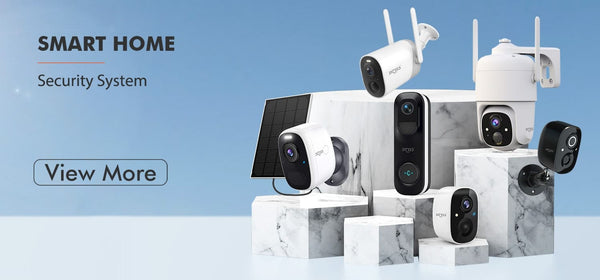
Types of Security Cameras
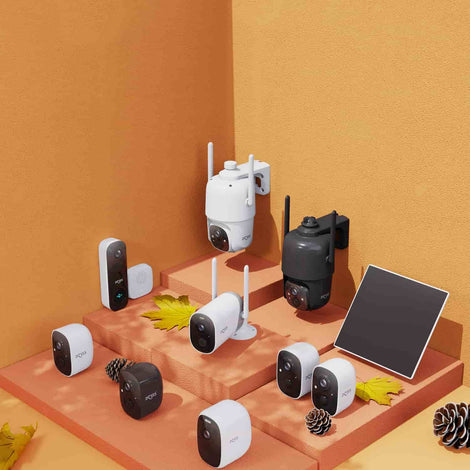
Security cameras come in several types, including wired, wireless, indoor, outdoor, and PTZ cameras. Wired cameras usually need a physical connection, while wireless cameras connect through Wi-Fi. Outdoor cameras are designed to handle weather, and PTZ cameras can pan, tilt, and zoom for wider coverage.
Choose the camera type based on your installation location, power access, monitoring area, and preferred level of flexibility.
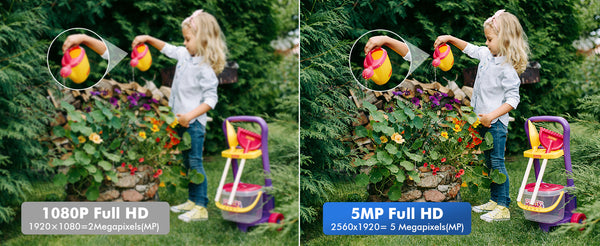
Resolution
Resolution refers to the number of pixels in an image and directly affects how clear the footage looks. Common camera resolutions include 1080P, 2K, 4MP, and higher-resolution options.
Higher resolution helps capture more detail, but it may also require more storage space. Choose a resolution that matches the area you need to monitor.

Field of View
Field of view refers to the area a camera can cover. A wider field of view can monitor more space, while a narrower view can focus on a specific location.
For larger areas such as driveways, yards, garages, and storefronts, PTZ cameras are useful because they can rotate and cover a wider scene.

Night Vision
Night vision is especially important for outdoor cameras. It allows the camera to capture clearer footage in low light or darkness.
Some cameras use infrared night vision, while others use color night vision, spotlight, or floodlight features to show more useful nighttime detail.

Motion Detection
Motion detection allows a camera to detect movement and trigger an alert. It helps you monitor your property and respond faster to important activity.
Some cameras support advanced detection features, such as person detection, object detection, motion zones, or tracking features.
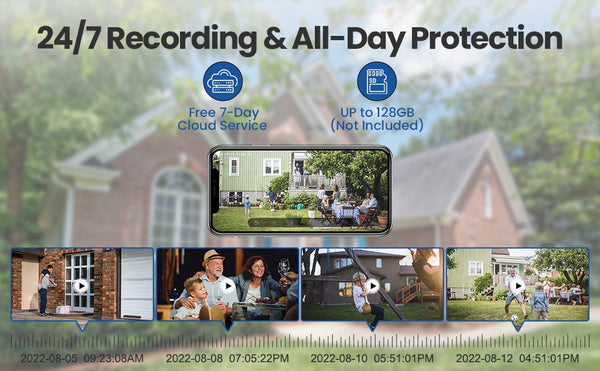
Storage
Security cameras need storage to save recorded footage. There are two common storage options: local storage and cloud storage.
Local storage usually uses a microSD card, while cloud storage saves footage remotely and can help protect recordings if the camera is damaged or stolen.
Connectivity
Connectivity refers to how the camera connects to the network. Wired cameras need a physical connection, while wireless cameras connect through Wi-Fi or cellular networks.
Wi-Fi cameras are convenient for home use, while 4G LTE cameras can be useful in locations where Wi-Fi is unavailable.
Power Source
Security cameras require power to work. Some cameras use a power cord, while others use rechargeable batteries or solar panels.
Battery-powered cameras are easier to place, while solar-powered cameras can reduce the need for frequent charging in outdoor areas.
Installation
Installation is an important consideration when choosing a security camera. Some cameras require professional installation, while others are designed for simple DIY setup.
If you rent your home or want a cleaner installation, a magnetic mount or wireless camera can make setup easier.
Cost
Security camera prices vary depending on type, features, resolution, storage options, and brand. Basic cameras may cost less, while PTZ cameras and cameras with advanced smart features may cost more.
Consider your budget, but also look at long-term value. A camera with better video quality, reliable alerts, and flexible storage may provide better protection over time.
Security Camera Feature Comparison
Use this quick comparison table to match common security camera needs with the right Dzees product or collection.
| Need | Recommended Option | Best For |
|---|---|---|
| Easy wireless setup | Wireless Security Cameras | Homeowners, renters, front doors, garages, and patios. |
| Wide-area coverage | PTZ Security Cameras | Driveways, backyards, stores, and large outdoor areas. |
| Magnetic no-drill setup | Dzees G9 Magnetic Wireless Camera | Apartments, rentals, entryways, and flexible placement. |
| Cloud recording | Cloud Storage Service Plan | Remote backup and easier video access. |
| Local storage | Dzees Micro SD Card | Local video storage and privacy-focused users. |
Final Thoughts
Security cameras are essential tools for protecting your property and loved ones. Understanding the different types, features, and buying considerations can help you choose a camera that meets your real security needs.
Before installing a camera, always check local laws and regulations related to security camera use, recording, and privacy. Rules can vary depending on your location.
A good home security camera should be clear, reliable, easy to install, and matched to the area you want to monitor.
All About Your Security
Explore Dzees security cameras for front doors, garages, patios, backyards, indoor spaces, driveways, and wide-area monitoring.
If you liked this blog, follow along so you don't miss the next home security guide.




1 Kommentar
Excellent blog! It provides a clear view of the various types of security cameras, making it easier to choose the right one. The emphasis on <a href = “https://ohzsecurity.com”> wireless security camera and their convenience for flexible placement is very helpful.