


Where to Install a Solar Security Camera for Better Outdoor Coverage
Choosing the right outdoor security camera is only the first step. Where you install it can affect its viewing coverage, Wi-Fi connection, motion detection and solar charging performance. A carefully selected position helps your camera monitor the areas that matter while making everyday use more convenient.
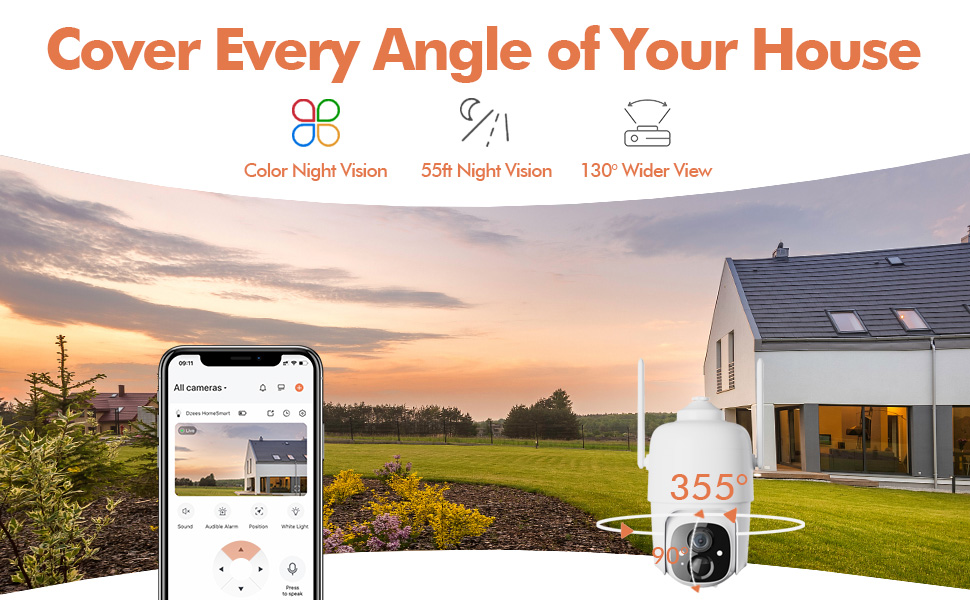
The Dzees D3K solar-powered PTZ security camera is designed for flexible outdoor monitoring with 2K video, 355° horizontal pan, 90° vertical tilt and solar-assisted charging. This guide explains how to select a practical installation location without relying on complicated wiring.
What to Check Before Installing a Solar Security Camera
A good installation location needs to balance several requirements. Choosing a position based only on the camera’s view may result in weak Wi-Fi or poor solar charging. Before drilling mounting holes, check the intended position for the following conditions.
Viewing Coverage
Confirm that the camera can clearly view the entrance, driveway, backyard or other area you want to monitor.
2.4GHz Wi-Fi
Test the network signal at the installation point because the D3K connects to 2.4GHz Wi-Fi only.
Available Sunlight
Select a suitable position for the solar panel where direct sunlight is available during the day.
Secure Mounting
Use a stable wall or structure that can support the camera and keep it securely positioned outdoors.
1. Install the Camera Near Important Entry Points
Doors, gates, driveways and garages are common areas where people, packages and vehicles may enter your property. Installing a camera near these locations can help you receive alerts and review relevant activity through the mobile app.
The D3K supports AI detection for people, vehicles, packages and animals, along with customizable activity zones. Activity zones can help focus monitoring on a specific entrance or section of the property.
Front Door or Porch
Position the camera where it can view approaching visitors and the area where deliveries are normally placed. Two-way audio allows you to communicate with visitors or delivery drivers through the app.
Driveway or Garage
A location overlooking the driveway can provide a broader view of arriving vehicles and movement near the garage. Use digital zoom when you need to inspect a specific part of the image more closely.
Backyard or Side Gate
Installing the camera where it can view a gate, pathway or backyard entrance can help reduce outdoor blind spots. PTZ control lets you inspect different directions remotely.
2. Use PTZ Coverage to Reduce Outdoor Blind Spots
The Dzees D3K offers 355° horizontal pan and 90° vertical tilt. Instead of pointing permanently in one direction, the camera can be repositioned remotely through the app to view different parts of the surrounding area.
This flexibility is particularly useful when a mounting location overlooks several important areas. For example, one position may provide access to views of a driveway, front path and side entrance.
Create Five Preset Viewing Positions
The camera lets you save up to five custom viewpoints. After identifying the most important areas around your property, save each one as a preset position for faster access.
- Preset 1: Main entrance
- Preset 2: Driveway
- Preset 3: Garage door
- Preset 4: Side gate
- Preset 5: Backyard or another priority area
3. Check the Wi-Fi Signal Before Mounting
The D3K requires a 2.4GHz Wi-Fi connection. Although 2.4GHz networks are commonly used for outdoor smart devices, walls, distance and other physical obstructions can affect connection quality.
Before completing the installation, connect and test the camera near the intended location. Confirm that live view, alerts and app controls work reliably.
- Confirm that your router provides a 2.4GHz Wi-Fi network
- Test live video at the intended camera location
- Check whether app controls respond consistently
- Avoid placing the camera behind large metal obstructions
- Complete setup before mounting the camera in a difficult-to-reach area
4. Give the Solar Panel Access to Direct Sunlight
The included solar panel assists with charging the camera’s rechargeable battery. Solar charging performance depends on sunlight intensity, weather conditions and panel placement, so the panel should not be installed solely based on convenience.
Choose a location that receives suitable direct sunlight and avoid positions that remain heavily shaded by a roof, tree, wall or nearby structure. The best panel position may be different from the best camera viewing position.
Solar Panel Placement Checklist
- Select a position with access to direct sunlight
- Keep the panel away from persistent shade where possible
- Secure the panel firmly to a stable surface
- Make sure the charging connection can reach the camera safely
- Check the panel periodically for dirt or obstructions
Seasonal changes may affect sunlight exposure. A position that receives strong sunlight during one season may become shaded during another, so periodic checks can help maintain more consistent charging.
5. Position the Camera for Useful Motion Detection
The D3K uses 130° PIR motion detection and supports adjustable detection zones and sensitivity. For more useful alerts, position the camera so relevant activity passes through the monitored area instead of remaining outside its view.
After installation, use the app to review the live image and adjust the activity zone. Focus on the part of the scene where people, vehicles, packages or animals are most likely to appear.
Common Areas to Exclude When Possible
- Busy public roads outside the property
- Frequently moving branches close to the camera
- Areas outside the property that do not need monitoring
- Obstructions that block the camera’s main viewing angle
Detection sensitivity, activity zones, recording schedules and notification schedules can be adjusted to better match how you use the monitored area.
6. Plan for Day-and-Night Monitoring
A useful camera position should provide a clear view during both daytime and nighttime monitoring. The D3K supports full-color night vision, allowing it to provide additional visual information in low-light conditions.
The camera also includes a spotlight, siren and two-way audio. When an unexpected event occurs, you can view the live feed, speak through the camera or activate supported deterrence features from the app.
- Check the live image after dark
- Make sure nearby objects do not dominate the night view
- Test two-way audio from the monitored area
- Confirm app notifications are enabled
- Review spotlight and siren settings in the app
Recommended Installation Areas at a Glance
| Installation Area | Monitoring Benefit | Helpful D3K Feature |
|---|---|---|
| Front door | Monitor visitors and deliveries | Package detection and two-way audio |
| Driveway | View arriving vehicles and movement | Vehicle detection and 2K video |
| Garage | Check an important exterior access point | PTZ control and preset positions |
| Backyard | Monitor a wider outdoor space | 355° pan and 90° tilt |
| Side gate | Reduce blind spots around a secondary entrance | Activity zones and app alerts |
What to Avoid During Installation
Even a feature-rich outdoor security camera may perform poorly if it is installed in an unsuitable location. Avoid finalizing the installation until you have tested the camera, connection and solar panel.
- Do not assume a 5GHz-only network will connect to the camera
- Do not place the solar panel in an area that remains heavily shaded
- Do not allow nearby objects to block the PTZ movement or camera view
- Do not mount the camera before testing the Wi-Fi connection
- Do not expect this battery camera to provide continuous 24/7 recording
Frequently Asked Questions
Does the camera need to be installed beside the solar panel?
The camera and solar panel should be positioned so the charging connection can reach safely. The panel should be placed where it can receive suitable sunlight, while the camera should be positioned for useful monitoring coverage.
Can the Dzees D3K be installed outdoors?
Yes. The D3K has IP66 weather protection and is designed for outdoor monitoring. Both the camera and solar panel should be securely mounted.
What Wi-Fi network does the camera require?
The D3K connects to 2.4GHz Wi-Fi only. It does not support a 5GHz-only connection.
Can I move the camera view after installation?
Yes. The app lets you control the camera’s 355° horizontal pan and 90° vertical tilt. You can also save up to five preset viewing positions.
Does the camera support local storage?
Yes. The D3K supports a compatible microSD card with a capacity of up to 128GB. The card is sold separately unless it is included in the selected product option. Optional cloud storage is also available.
Can the camera record continuously?
The D3K is designed primarily for motion-triggered recording rather than continuous 24/7 recording.
Build a Better Outdoor View with the Dzees D3K
A successful solar security camera installation starts with careful planning. Look for a position that offers useful viewing coverage, stable 2.4GHz Wi-Fi and a secure mounting surface. Then place the solar panel where it can receive suitable direct sunlight.
With 2K video, flexible PTZ control, five preset positions, intelligent detection and full-color night vision, the Dzees D3K can help monitor several important outdoor areas from one convenient app.
Ready for Smarter Outdoor Coverage?
Explore the Dzees D3K solar-powered PTZ security camera and check the latest product options, availability and purchasing information.
Get the Dzees D3K