


Where to Install Outdoor Security Cameras? 9 Smart Placement Tips for Better Home Protection
Where to Install Outdoor Security Cameras? 9 Smart Placement Tips for Better Home Protection
Even a high-quality security camera cannot protect what it cannot see. Choosing the right installation location is one of the most important steps in building an effective home security setup.
Whether you want to monitor your driveway, garage, backyard, front entrance, or side gate, proper camera placement helps improve visibility, reduce unnecessary alerts, and make everyday monitoring easier.
In this guide, we share nine practical tips for installing wireless outdoor security cameras, including PTZ models with rechargeable batteries and optional solar panel kits.
Quick Answer: The best outdoor camera locations are usually near important access points such as the front entrance, driveway, garage, backyard gate, and side walkway. Mount each camera where it has a clear, useful view while remaining secure and accessible for maintenance.
1. Why Outdoor Security Camera Placement Matters More Than You Think
Buying a camera with excellent features is only the first step. Where you install it can make a major difference in the usefulness of its footage.
A poorly positioned camera may capture too much sky, miss an important entrance, or struggle with glare and obstructions.
On the other hand, a carefully positioned camera can help you monitor important activity without constantly adjusting the viewing angle.
Capture the Areas That Matter
Position cameras toward entrances, walkways, parked vehicles, and other important areas.
Avoid Blocked Viewing Angles
Keep walls, trees, decorations, and other objects from blocking the camera's view.
Minimize Glare and Reflections
Avoid pointing the camera directly toward bright lights or reflective surfaces when possible.
Focus on Relevant Activity
Proper placement can help reduce notifications from unnecessary background motion.
2. The Best Places to Install Outdoor Security Cameras Around Your Home
Before drilling any holes, walk around your property and identify the locations you want to monitor most.
Front Door and Main Entrance
Your front entrance is one of the most important places to monitor. It is where visitors approach, deliveries arrive, and daily activity frequently occurs.
Driveway and Parking Area
A driveway camera helps you check parked vehicles, approaching visitors, and movement near your garage.
Garage Door and Side Entrance
Garages often contain tools, vehicles, bicycles, and other valuable belongings. Consider monitoring both the main garage entrance and any side door.
Backyard and Patio
Backyards may include patios, fences, sheds, garden paths, and multiple access points. Choose a location that offers a useful view of the most important zones.
Side Gate and Walkway
Side entrances are sometimes overlooked because they are not visible from the front of the house. A dedicated camera can help monitor these areas.
| Location | What to Monitor | Placement Priority |
|---|---|---|
| Front Entrance | Visitors and deliveries | High |
| Driveway | Vehicles and approaches | High |
| Garage | Doors and exterior access | High |
| Backyard | Patio, fence and gates | Depends on layout |
| Side Walkway | Secondary access points | Depends on layout |
3. Nine Smart Outdoor Security Camera Installation Tips
01 Position the Camera at a Practical Mounting Height
Mount the camera high enough to discourage easy tampering, but not so high that useful details become difficult to see. Choose a height that follows the manufacturer's instructions and suits the monitoring area.
02 Avoid Pointing Directly Toward Bright Lights
Strong sunlight, headlights, and nearby outdoor lighting can create glare or reduce image clarity. Test the viewing angle during different times of day.
03 Keep Trees and Walls Outside the Main View
Branches, fences, columns, and decorations may block important activity. Select a mounting location with a clear line of sight toward your priority areas.
04 Check Wi-Fi Signal Strength Before Mounting
Wireless cameras need a compatible, reliable network connection for remote viewing and app notifications. Test the camera at the intended location before drilling.
05 Focus on Entrances and Important Activity Zones
Rather than trying to capture every possible outdoor direction, prioritize doorways, pathways, driveway entrances, and areas near valuable property.
06 Test Night Vision After Installation
Nighttime visibility can change depending on nearby lights, reflective surfaces, and camera positioning. Review a nighttime image before finalizing the setup.
07 Leave Enough Clearance for PTZ Movement
A PTZ camera needs space to rotate and tilt. Avoid mounting it too close to walls, roof edges, or other structures that may block its movement or viewing angle.
08 Make Solar Panel Placement Part of Your Plan
If you choose a camera kit with a solar panel, position the panel where it can receive adequate sunlight. Check cable length and compatible mounting positions before installation.
09 Respect Privacy and Local Recording Rules
Position cameras to focus on your own property and legitimate security needs. Avoid recording private areas belonging to neighbors, and review applicable local rules on video and audio recording.
4. Why PTZ Cameras Offer More Flexible Outdoor Installation
Traditional fixed cameras require careful adjustment because they monitor one direction after installation.
A PTZ security camera provides additional viewing flexibility through remote pan and tilt control.
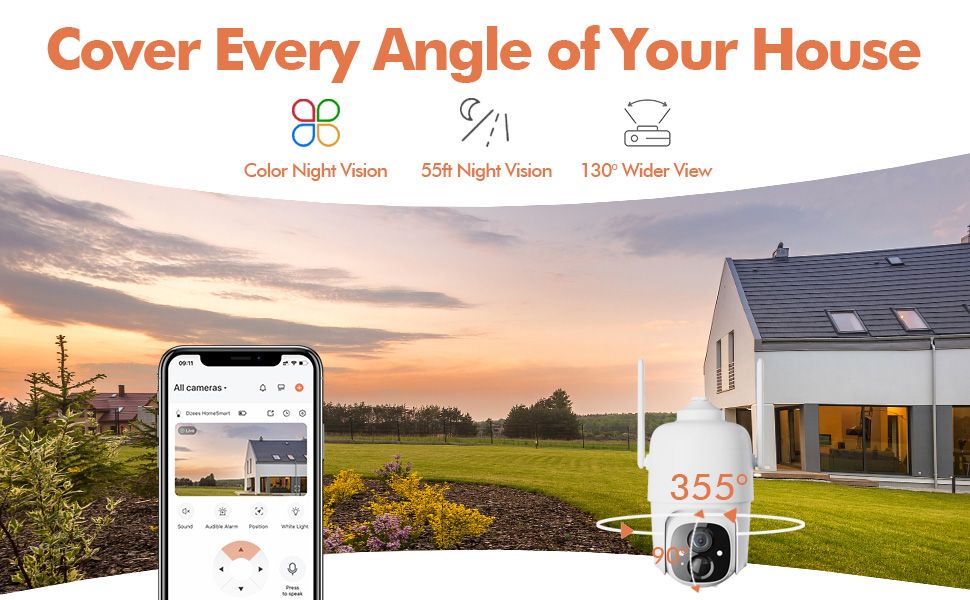
Selected Dzees 2K PTZ cameras support up to 355° horizontal pan and 90° vertical tilt, helping homeowners inspect wider areas.
Where PTZ Viewing Can Be Especially Helpful
- Driveways with multiple parking areas
- Backyards with patios and side gates
- Garage corners overlooking walkways
- Front yards with more than one approach path
- Outdoor areas where viewing needs change
PTZ movement can reduce certain blind spots, but one camera cannot continuously observe every angle simultaneously. Multiple cameras may still be useful for larger properties.
5. Solar-Powered vs Battery-Only PTZ Camera Installation
Dzees offers PTZ cameras in different configurations, including rechargeable battery options and camera kits that include solar panels.
Simple Wireless Installation Without a Solar Panel
A battery-only camera can be a practical choice when you have convenient access for recharging or limited direct sunlight.
- Flexible camera placement
- No permanent power wiring
- No solar panel to mount
- Periodic battery recharging
Convenient Outdoor Charging with a Solar Panel Kit
A compatible solar panel helps recharge the battery during daylight and may reduce the need for manual charging.
- Solar-assisted battery charging
- Useful for sunny outdoor locations
- Convenient for higher mounting positions
- Solar output depends on available sunlight
How to Position a Solar Panel for Better Charging
The solar panel should receive as much useful direct sunlight as possible. Avoid locations permanently shaded by roof overhangs, trees, or nearby buildings.
Consider seasonal changes in sunlight, the panel's mounting angle, and the distance between the panel and camera.
In some cases, the best camera viewing position and the best solar panel location are different. A compatible separate panel mount can offer more placement flexibility.
Explore Battery & Solar PTZ Cameras6. Common Outdoor Security Camera Installation Mistakes to Avoid
| Common Mistake | Why It Matters | Better Approach |
|---|---|---|
| Mounting Too High | Important details may be harder to see | Choose a practical height and test the image |
| Ignoring Wi-Fi Strength | Remote access may become unreliable | Test the connection before permanent mounting |
| Pointing at Bright Lights | Glare may reduce visibility | Adjust the angle and test at night |
| Blocking PTZ Movement | Camera rotation may be restricted | Leave sufficient clearance |
| Placing Solar Panels in Shade | Charging may be reduced | Choose a location with suitable sunlight |
| Overlooking Other Entrances | Important areas may remain unmonitored | Consider additional cameras where needed |
7. Choose Dzees Wireless PTZ Security Cameras for Flexible Home Monitoring
A flexible camera can make outdoor monitoring easier, especially when your property includes multiple entrances or activity areas.
Dzees offers wireless PTZ security cameras with rechargeable battery power, adjustable viewing angles, and solar-assisted configurations.
Dzees PTZ Security Camera Collection
Explore camera-only options, solar-assisted kits, and multi-camera packages designed for different home security needs.
Compare available products and choose a setup that fits your driveway, garage, backyard, and front entrance.
Shop Dzees PTZ Security Cameras8. Final Installation Checklist: What to Do Before Mounting Your Camera
Check These Before You Drill
- Identify the entrances and areas you need to monitor.
- Choose a stable, secure mounting surface.
- Check Wi-Fi signal strength.
- Test the camera's live view.
- Verify PTZ movement clearance.
- Review daytime and nighttime visibility.
- Confirm battery charging access.
- Position the solar panel if your kit includes one.
- Adjust motion detection settings after installation.
- Confirm applicable privacy and recording requirements.
9. Frequently Asked Questions About Outdoor Camera Placement
Where is the best place to install an outdoor security camera?
Good locations include front entrances, driveways, garages, backyards, and side gates. The best position depends on your property's layout and monitoring priorities.
How high should I mount my outdoor camera?
Choose a height that provides a clear view while discouraging easy tampering. Follow the manufacturer's mounting instructions and test image quality before permanent installation.
Can I install a wireless camera without electrical wiring?
Yes. Battery-powered wireless security cameras can operate without a permanent power cable. Battery charging is still required, and solar-assisted kits may reduce manual charging.
Where should I install a PTZ camera for the best coverage?
Consider locations with clear views of multiple nearby areas. Make sure the camera has adequate clearance for pan and tilt movement.
Does a solar security camera need direct sunlight?
Direct sunlight generally improves solar charging. A camera may still operate on stored battery power during cloudy periods, but charging performance can decrease when sunlight is limited.
Should a security camera face the street?
Focus the camera on legitimate monitoring needs and your own property where possible. Consider neighboring privacy and applicable local recording rules.
Can one PTZ camera cover my entire property?
A PTZ camera can inspect different viewing directions, but it cannot monitor all directions simultaneously. Larger properties may benefit from multiple cameras.
Can I install a battery-powered PTZ camera under a roof overhang?
Yes, if the location meets the camera's mounting and operating requirements. A sheltered location may be useful, but it can reduce sunlight for an attached solar panel.
10. Final Thoughts: Smarter Placement for Better Outdoor Home Security
Choosing the right camera is important, but choosing the right installation location is equally valuable.
Start by identifying your most important monitoring areas. Check viewing angles, mounting height, Wi-Fi signal, nighttime conditions, and power availability.
A wireless PTZ security camera provides flexible viewing control, while rechargeable battery and solar-assisted options help simplify outdoor installation.
Whether you need a single camera for your driveway or several cameras for multiple entrances, explore the Dzees PTZ collection to find a setup that suits your home.
Better Placement. Wider Coverage. Smarter Protection.
Explore Dzees wireless PTZ security cameras with 2K video options, adjustable pan-and-tilt coverage, rechargeable battery power, and available solar panel kits.
Choose the right security camera setup for your driveway, garage, backyard, and front entrance.
Explore Dzees PTZ Cameras Now