


Can One Outdoor Camera Watch Your Driveway, Porch and Backyard?
Many homes have more than one area worth checking: a driveway where vehicles arrive, a porch where packages are delivered, a side gate that should remain closed and a backyard where children or pets spend time. Installing a separate camera for every direction is not always convenient.
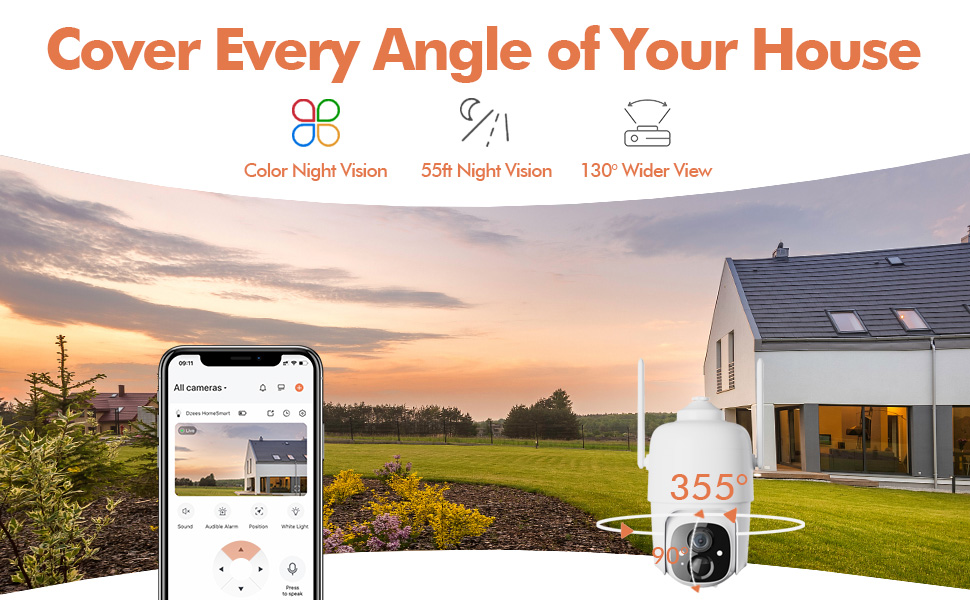
The Dzees D3K solar-powered 2K PTZ security camera offers 355° horizontal pan, 90° vertical tilt and up to five saved viewing positions. From a well-selected mounting point, those controls can make it easier to move between several important views through the app.
Start with a Simple Three-Step Coverage Plan
Good coverage begins before the camera is mounted. Walk around the property, identify the areas that matter most and look for a position with a clear line of sight to several of them.
Choose Priorities
List the entrances, paths and activity areas you check most often.
Find a Shared Viewpoint
Look for one elevated location that faces multiple priority areas without major obstructions.
Test Before Mounting
Confirm Wi-Fi strength, live video, PTZ movement and solar-panel reach before drilling.
Where Should You Position a PTZ Outdoor Security Camera?
A corner position often provides more usable directions than a camera placed in the middle of a flat wall. For example, mounting near the corner of a garage may allow the camera to turn toward the driveway, front path and side yard—provided the roofline, gutters and walls do not restrict movement.
- Choose an elevated location that remains practical to access
- Keep walls, gutters and branches outside the PTZ movement path
- Avoid pointing directly into intense lights when possible
- Make sure faces are likely to pass through the useful part of the frame
- Verify that the location receives a stable 2.4GHz Wi-Fi signal
- Place the solar panel where it can receive suitable direct sunlight
Turn Five Preset Positions into a Daily Security Routine
Instead of manually searching for the same camera angle every time, the D3K allows you to save up to five custom viewing positions. Your exact choices should reflect the layout of your home, but a practical arrangement may look like this:
Example Preset Plan
Saved positions are especially useful when checking the property at predictable times. Before bed, for example, you can move between the driveway, entrance, gate and backyard views without repeatedly adjusting the camera one direction at a time.
Match Each Viewing Area with the Right Purpose
Driveway
Check vehicle activity, arrivals and the area near a parked car.
Front Porch
Review visitors, supported person alerts and package activity near the entrance.
Garage
Inspect the garage door and surrounding approach after receiving an alert.
Side Gate
Keep a less visible access route available as a saved viewing position.
Backyard
Check common outdoor activity areas remotely when the layout allows.
Walkway
Monitor a path that connects the street, driveway or side yard to the home.
Use Detection Settings to Reduce Unnecessary Alerts
Wide outdoor views can include streets, sidewalks, moving branches and neighboring activity. The D3K supports 130° PIR motion detection and AI detection for people, vehicles, packages and animals. Detection zones, sensitivity, recording schedules and notification schedules can be adjusted to better match the scene.
| Area | Suggested Focus | Useful Setup |
|---|---|---|
| Driveway | Vehicles and people approaching the property | Focus the activity zone on the private driveway rather than the road |
| Porch | Visitors and package activity | Frame the doorway and delivery area while excluding distant movement |
| Side Gate | People or animals entering the passage | Use a focused detection zone and adjust sensitivity after testing |
| Backyard | People, pets and unexpected activity | Set notification times around the hours the yard is normally unused |
See and Respond When Activity Happens After Dark
The D3K supports full-color night vision, two-way audio, a spotlight and a siren. If you receive a supported alert, you can open live video, move to the relevant preset position and assess the scene before choosing an appropriate response.
- Open live video to see what triggered the event
- Select the closest saved viewing position
- Use up to 4× digital zoom to enlarge part of the image
- Speak and listen through two-way audio
- Use the spotlight or siren when appropriate
Digital zoom enlarges the existing image on screen; it does not create detail beyond the original 2K/3MP video. Nighttime clarity will also vary with placement, distance and surrounding light.
Keep Solar Charging and Wi-Fi in the Plan
The D3K uses a rechargeable battery with solar-assisted charging, which allows wire-free camera placement without a permanent electrical cable. The solar panel should be positioned for suitable sunlight and checked periodically for shade, dirt or other obstructions.
Remote live view, notifications and PTZ controls require a suitable network connection. The D3K supports 2.4GHz Wi-Fi only, so test the actual outdoor signal before completing the installation.
Frequently Asked Questions
Can one Dzees D3K replace several fixed cameras?
It may reduce the number of fixed views needed when several areas are visible from one mounting position. However, it cannot view multiple directions simultaneously or see around solid obstacles.
Can I save different camera angles?
Yes. The D3K supports up to five preset viewing positions, which can be assigned to areas such as a driveway, porch, garage, gate or backyard.
Does the D3K automatically track moving objects?
The confirmed D3K features include intelligent detection and remote PTZ control, but automatic motion tracking is not listed as a supported feature on the referenced product information.
Does the camera watch all preset positions at the same time?
No. A PTZ camera faces one direction at a time. Presets provide a convenient way to return to saved views.
Does the D3K work with 5GHz Wi-Fi?
No. The camera connects to 2.4GHz Wi-Fi only.
Can it record continuously?
No. The battery-powered D3K is intended primarily for motion-triggered event recording rather than continuous 24/7 recording.
What local storage is supported?
The camera supports a compatible microSD card up to 128GB. Optional cloud storage is also available; check the app for current plans and terms.
Is the D3K suitable for outdoor use?
Yes. It has an IP66 rating for outdoor monitoring. Install both the camera and solar panel securely and follow the supplied installation guidance.
One Thoughtful Camera Position Can Do More
A PTZ security camera is most useful when its location, saved views and alert settings work together. By identifying priority areas first, testing the Wi-Fi and PTZ range, and creating a clear preset plan, you can make routine outdoor checks faster and more organized.
The Dzees D3K brings together 2K/3MP video, 355° pan, 90° tilt, five preset positions, smart detection, full-color night vision and solar-assisted charging. For homes with several visible outdoor areas near one suitable mounting point, it offers a flexible alternative to relying on a single fixed camera angle.
Bring More of Your Property into View
Explore the Dzees D3K solar-powered 2K PTZ security camera and check the latest product options, availability and purchasing information.
Shop Dzees D3K